Pages

Sunday, February 16, 2025

RS485 Modbus to Raspberry Pi Pico 2W


A while ago I went to order a wind vane and Anemometer online and didn't pay attention and ended up receiving RS485 units rather than the 0-10VDC units I wanted....grin

This gave me the incentive to learn how to connect RS485 devices to ESP8266's, ESP32's and in this case a new Raspberry Pi Pico 2W that had just arrived.

Here is the TTL > RS485 board I am using:


The wind vane and Anemometer are already outside so I ordered a couple of Temperature & Humidity sensors that you see here to continue to experiment with the RS485 protocol. On the breadboard you can see the Pico 2W on the left and then side by side is the TTL > RS485 board and a RFID-RC522 board that I've been playing with on the Arduino Uno shown at the top of the picture.

I wasn't able to connect a RS485 device to a ESP8266 since, as I understand it, the main UART is used for the serial USB communication and the second UART is transmit only? So in the case of the wind vane and Anemometer I used a couple of ESP32's. Normally you can connect multiple RS485 devices on the same bus as long as you set unique addresses on each, however I haven't done that yet, so I connected each device to it's own ESP32. 

Given the low cost of the Pico 2W from  pishop.ca I was able to use the same software from the Arduino Modbus sketch and just change the Tx & Rx pin assignments.

The next step will be to add wireless & mqtt code to the Pico 2W so that it can transmit the temperature and humidity values to my mosquitto broker to be read by Node-Red on my Raspberry Pi

Thanks for reading!

Here is the code:

/* 

 *  TempHumidRS485a.ino

 *  Robin Greig

 *  2025.02.15

 *  

 *  Reads the Temp & Humidity of RS485 device and prints it to Serial Monitor

 *  

 *  Based on the ModbusMaster example below

*/


#include <ModbusMaster.h>       //https://github.com/4-20ma/ModbusMaster

#include <SoftwareSerial.h>


// Create a SoftwareSerial object to communicate with the MAX485 module

SoftwareSerial mySerial(1, 0); // RX, TX


// Create a ModbusMaster object

ModbusMaster node;


void setup() {

  // Initialize serial communication for debugging

  Serial.begin(115200);

  // Initialize SoftwareSerial for Modbus communication

  mySerial.begin(9600);


  // Initialize Modbus communication with the Modbus slave ID 1

  node.begin(1, mySerial);


  // Allow some time for initialization

  delay(1000);

}


void loop() {

  uint8_t result;   // Variable to store the result of Modbus operations

  uint16_t data[2]; // Array to store the data read from the Modbus slave


  // Read 2 holding registers starting at address 0x0000

  // This function sends a Modbus request to the slave to read the registers

  result = node.readHoldingRegisters(0x0000, 2);


  // If the read is successful, process the data

  if (result == node.ku8MBSuccess) {

    // Get the response data from the response buffer

    data[0] = node.getResponseBuffer(0x00); // Humidity

    data[1] = node.getResponseBuffer(0x01); // Temperature


    // Calculate actual humidity and temperature values

    float humidity = data[0] / 10.0;      // Humidity is scaled by 10

    float temperature = data[1] / 10.0;   // Temperature is scaled by 10


    // Print the values to the Serial Monitor

    Serial.print("Humidity: ");

    Serial.print(humidity);

    Serial.println(" %RH");


    Serial.print("Temperature: ");

    Serial.print(temperature);

    Serial.println(" °C");

    Serial.println();

  } else {

    // Print an error message if the read fails

    Serial.print("Modbus read failed: ");

    Serial.println(result, HEX); // Print the error code in hexadecimal format

  }


  // Wait for 2 seconds before the next read

  delay(5000);

}

Saturday, February 8, 2025

RFID on Arduino


 I've been wanting to get develop a low security wooden lock box that I can use for a project. I've had these RFID-RC522 units for quite awhile and it was time to get back playing with them.

Rui & Sara Santos of Random Nerd Tutorials have a great tutorial on how to hook this up to an Arduino Uno as shown or ESP8266 or even ESP32 (both with WiFi). They also have a tutorial for using this RFID reader as an attendance checker.

I picked these up off from Phillip Fry Electronics Canada however they seem to be offline since Canada Post went on strike last fall and you can also get them off ebay. Inexpensive devices and the kits usually come with a card and keychain dongle. 

I've got a red LED inbetween the wires that I've hooked to a GPIO on the Uno and if the card ID is accepted, the LED lights. I could use that output with a FET to power a solenoid to unlock the door of my lockbox. 

Thanks for reading,

Robin

08 Feb 2025

Monday, January 27, 2025

Understanding RSSI

 Understanding RSSI (Received Signal Strength Indicator) can be a confusing topic to understand how strong the radio / wifi signal is to your device. Here is a great chart to help:


 I often add RSSI feedback from my ESP8266 devices so that I can confirm that they have good signal strength where I place them.


Sunday, April 7, 2019

I finally got around to installing a set of fuses and a terminal strip on an old computer power supply that I had. 3.3V @ 20A, 5V @ 16A, 12V @ 16A, thus the need for fuses! I also added a small digital voltage regulator that you can see in the bottom left of the pic, so I have a variable power supply that I can step down to a specific voltage if necessary.
Thanks for viewing!
Robin

Tuesday, March 26, 2019

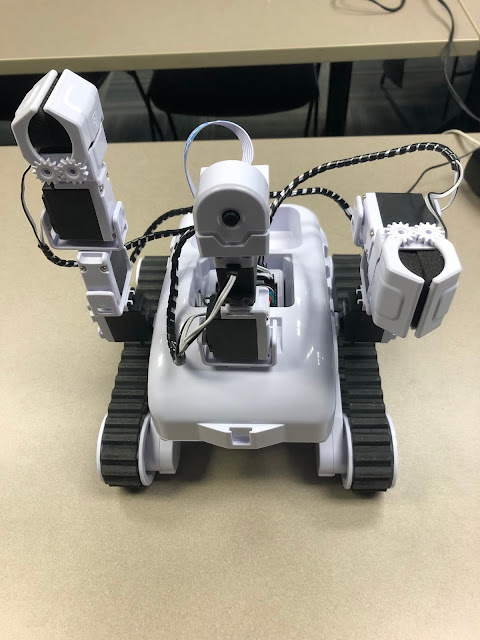
EZ-Robot Roli


I've been taking a course to learn all of the features of this EZ-Robot Roli. It has an awesome software package that enables you to perform facial recognition, voice commands, line following, etc.
I'll be teaching this course in May and am looking forward to all of the great ideas my students will come up with.
You can find out more at EZ Robot Website
Thanks for visiting!
Robin

Tuesday, January 29, 2019

PIC Programming with PICkit 2

Wow!, I make one post then turn around and another year has passed me by....YIKES!
What I am going to try to do is take a pic of each of the projects I'm working on and post them here. I've been busy with Raspberry Pi attendance monitors (Pi, Barcode Scanner & mariadb backend), Pi remote controls (using the above attendance monitor) and have gone back to playing with PIC micros using assembler and C compiler!

Here is a photo of my ...old... PICkit 2 connected to the microchip Low Pin Count Demo board. If you want to check out some AWESOME tutorials on programming the PIC's go to David Meiklejohn's site gooligum (cool name!)

Sunday, July 9, 2017

Raspberry Pi 3 Alarm System

What is this mess, you might ask?

Well this is the final prototype for my Raspberry Pi 3 Alarm system. It uses the USB keypad in the upper left corner to input the correct code, the entry and exit delay beeper is in the lower left of the photo beside the keyboard, and the LED's showing what is going on is on the breadboard just above the keyboard. You cannot see the PIR sensors, that I have mounted on the pole of the shelf that is visible in the upper right of the picture.

The next step (today) is to mount all of the components on a board and see how everything will fit into the case!

I'll post a final pic once I have everything mounted in the case.

Thanks for viewing!
Robin