- Install Jesse 2015-11-21
- Go thru the configuration
(Menu > Preferences > Raspberry Pi Configuration) - Under the System Tab:
- Expand the filesystem
- Change the pi password
- Change the Pi Hostname
- Don’t automatically login to ‘pi’ user
- Under the Interfaces Tab:
- Camera = Disable
- SSH = Enable
- SPI = Enable
- I2C = Enable
- Serial = Disable
- I don’t change anything under the Performance Tab
- Under the Localisation Tab:
- Change the locale to Canada (English)
- Set the Timezone to Canada (America) > Mountain (Edmonton)
- I’m still having a problem with changing the keyboard layout
- It is a noted problem on the Raspberry Pi Forum
- Still using sudo raspi-config to config to Canada > English
- sudo apt-get update
- sudo apt-get upgrade
- sudo adduser robin
- sudo visudo to give robin the same rights as pi user
- sudo apt-get install arduino-mk
- sudo apt-get install arduino (add robin to dialout group)
- Make a link to the Arduino.mk file:
ln -s /usr/share/arduino/Arduino.mk ~/Arduino.mk - Copy the original avrdude.conf file into my home directory
- cp /etc/avrdude.conf ~/avrdude_gpio.conf
- Modify it to work with the GPIO pins
- nano ~/avrdude_gpio.conf
- Aff the following lines at the end of the file:
- # Linux GPIO configuration for avrdude
- # Change the lines below to the GPIO pins connected to the AVR
- programmer
- id = "pi_1";
- desc = "Use the Linux sysfs interface to bitbang GPIO lines";
- type = "linuxgpio";
- reset = 12;
- sck = 24;
- mosi = 23;
- miso = 18;
- ;
- With the Arduino connected to the Raspberry Pi, run the following line to make sure the Raspi can see the arduino:
sudo avrdude -p atmega328p -C ~/avrdude_gpio.conf -c pi_1 -v - git clone https://github.com/robingreig/raspi-git
- cp -r ~/raspi-git/Python ~ (to copy the Python directory to my home)
- cp -r ~/raspi-git/Uno ~ (to copy the Uno directory to my home)
- Goto the .hex file @ ~/Uno/Serial/Voltages/build-uno/Voltages.hex & run:
sudo avrdude -p atmega328p -C ~/avrdude_gpio.conf -c pi_1 -v -U flash:w:Voltages.hex:i - If you overwrite the bootloader, reload it by going to:
cd /usr/share/arduino/hardware/arduino/bootloaders/optiboot/
and running the avrdude line with the optiboot_atmega328.hex file
Wednesday, December 16, 2015
Avrdude 6.1
I just installed the latest version of Raspbian Jessie 2015-11-21 for my Pi 2's. I found that now when I installed the arduino package, it comes with avrdude 6.1. So I don't need to link to the adafruit repository anymore. Here is a list of the steps I take to install Jessie, Arduino, Arduino-mk, and check that I can communicate between the Arduino & Raspberry Pi 2 via Serial. You'll note that I clone my git repository where I keep all of my files as I'm working on them. I find this extremely useful since I'm working on the files on my Pi2 or Gertduino/PiB at home, or the same setup that I have at work:

Wednesday, December 9, 2015
Raspberry Pi takes over the world

OK, if not the world, then 1 outlet at a time!!!
This is a pic of a single relay that is controlled by my Raspberry Pi.
Red = 5VDC, Black = Ground, White = Pin23 (active high)
And an old pc power cord split in 1/2 and a female end installed.
The Ground and Neutral leads feed straight through from the input to the output
The relay switches the hot lead and runs a battery charger drawing 5 Amps AC.
The relay is rated for 10A @ 277V
The Raspberry Pi runs off of my solar array at home and because I have so many items tied to them:
3 Raspberry Pi's
1 x 12V HP switch
1 x Kenwood HF Amateur Radio
1 x LDG Antenna Tuner
1 x Radio Shack HTX-242 VHF Amateur Radio
Most days I have enough solar energy to power all my devices.
However if I get several cloudy days together, the voltage can drop and my charge controllers shut down.
Then my Raspberry Pi's shut down...... And that makes me cranky.....
So I have an Arduino monitoring the battery voltage and sends that data via serial to the Raspi
If the battery voltage drops down too much due to lack of sunlight, the charger is turned on for a charge cycle (typically 6-8 hours), and then shuts off.
I plan on making quite a few of these for the many different 120VAC loads that I want to control from my Raspi.
Thanks for viewing;
Robin
Monday, December 7, 2015
Upgrade from Halogen to LED

So, what do you do when you want to change from the small halogen lamps to LED?
Problem is that many halogen power supplies are rated @ 12 VAC, and LED's require 12 VDC.
What I've done here is to add a bridge rectifier and 1000uF/35V Capacitor to a small adjustable power supply.
Packed it in a small Hammond case and works like a charm!!!
I can feed this from the halogen supply with AC, and adjust it to deliver clean 12VDC to my LED's
I've got a customer with quite a few of these lites in all of their bathrooms, etc and it is very difficult to get at the halogen power supply.
So I can simply add this inline at the beginning of the lamp string(s), and presto! even more energy efficient lighting!!!
Thanks for viewing,
Robin
Friday, December 4, 2015
Raspberry Pi & Arduino talking nicely!!!

This is a picture of success!!!
Once again many thanks have to go out to Tony DiCola of Adafruit for publishing his most AWESOME tutorial on Programming an Arduino using the Raspberry Pi GPIO
This enabled me to upgrade to Avrdude 6.1 from the Adafruit Repository and then program the Arduino thru the ICSP header from the GPIO pins.
.... And the bonus is that I can leave my serial connection from the Raspi to the Arduino connected while the programming is taking place!!!!!
So follow his steps to download the new version of Avrdude to your Raspi and hook up the pins from the GPIO header to the Arduino ICSP header.
Test run the program to ensure it can see the Arduino and you're off!
You need to directly upload a .hex file using Avrdude, so the Arduino IDE will do the converting/building for you from .ino to .hex.
I've been using Arduino-mk to upload my .ino sketches (since I like using the command line), so now I just use Arduino-mk to make the sketches, and Avrudude61 to upload them.
The following steps outline Tony's process:
Step 1 - Add the Adafruit repository to the Raspi list using the command:
curl -sLS https://apt.adafruit.com/add | sudo bash
Step 2 - Install the new version of Avrdude by running the following:
sudo apt-get install avrdude
Step 3 - copy the /etc/avrdude.conf file to my home directory and rename it ~/avrdude_gpio.conf
Step 4 - add the following test to the end of the .conf file in my directory:
# Linux GPIO configuration for avrdude
# Change the lines below to the GPIO pins connected to the AVR.
programmer
id = "pi_1";
desc = "Use the Linux sysfs interface to bitbang GPIO lines";
type = "linuxgpio";
reset = 12;
sck = 24;
mosi = 23;
miso = 18;
;
Step 5 - run the following command to confirm connection to the Arduino:
sudo avrdude -p atmega328p -C ~/avrdude_gpio.conf -c pi_1 -v
Step 6 - Once successful, goto a directory with the .hex file you want to upload to the Arduino and run the following command:
sudo avrdude -p atmega328p -C ~/avrdude_gpio.conf -c pi_1 -v -U flash:w:Blink.cpp.hex:i
>>> and you should be able to watch Avrdude upload the sketch and verify it.
++++++++ Oh Yeah, and this is my first post done completely on my Rapsberry Pi 2 in the picture!!!! A little slower than I'm used to, but works great!!! +++++++
Sunday, November 15, 2015
Arduino & Raspberry Pi fighting

This has been my focus over the last couple of weeks (after my day job of course and the other courses I'm teaching!!!)
The top left is of course a Raspberry Pi2
To the right is an Arduino Uno clone
To the right of it is a relay board with 2 x 5VDC relays triggered from the Uno
And just above the relay board is my 12V > 5VDC power supply.
The bottom board and breadboard is a Raspi B model with a Gertduino board plugged in above it (you see 2 blue LED's lit). This is my prototyping setup for the Raspi > Uno Communications.
The Arduino powers on the left hand relay (you can just make out the Red LED) which powers on the Raspberry Pi (Raspi).
As well, the Uno monitors my battery voltage on Analogue A0 pin (batteries are not pictured).
The Raspberry Pi polls the Arduino for the Battery Voltage & if the battery voltage drops to 10.5VDC, the Raspberry Pi goes into shutdown (via a python script).
The Arduino continues to monitor the battery voltage and if it drops down to 10VDC, it shuts off the relay which powers the Raspberry Pi down safely.
Once the power is restored, the Arduino powers up and then powers up the Raspberry Pi safely.
The problem I've been struggling with though, is when the Raspberry Pi polls the Uno via the USB Cable (shown unplugged from the Uno in the picture above) the Uno resets every time which changes it's Digital output pins, which shuts down the Raspi......
Thanks to the great folks on the Arduino Forum (UKHeliBob & Robin2) I learned that when the Raspi talks to the Uno via the USB cable it includes resetting the Uno which resets the Digital pins......
What I needed to do was to talk via the 3 wire Serial (Tx, Rx, GND) between the Raspi & Uno and now no problems!!!!
You can see there is a purple and grey wire, as well as a Green/White pair running from the Uno to the Raspi. The Green/White pair have a set of resistors to drop the Uno 5VDC down to the Raspi 3.3VDC for the Serial comms. the other wires are the ground connections (1 redundant)
So it is a bit more work, to use the USB cable to program and then switch over to the 3 wire serial for comms, but really to see it working properly is not problem at all!!!
Sunday, November 1, 2015
VE6RBN-1 Back Online!!!
Wow!
My didipeater VE6RBN-1 has been offline for sometime and I didn't notice it.....
It was transmitting fine, but not digipeating the packets it received over the air...
Apparently my troubleshooting skills are really, really rusty because I checked out the complete TNC and radio, before looking that the obvious problems like wiring....
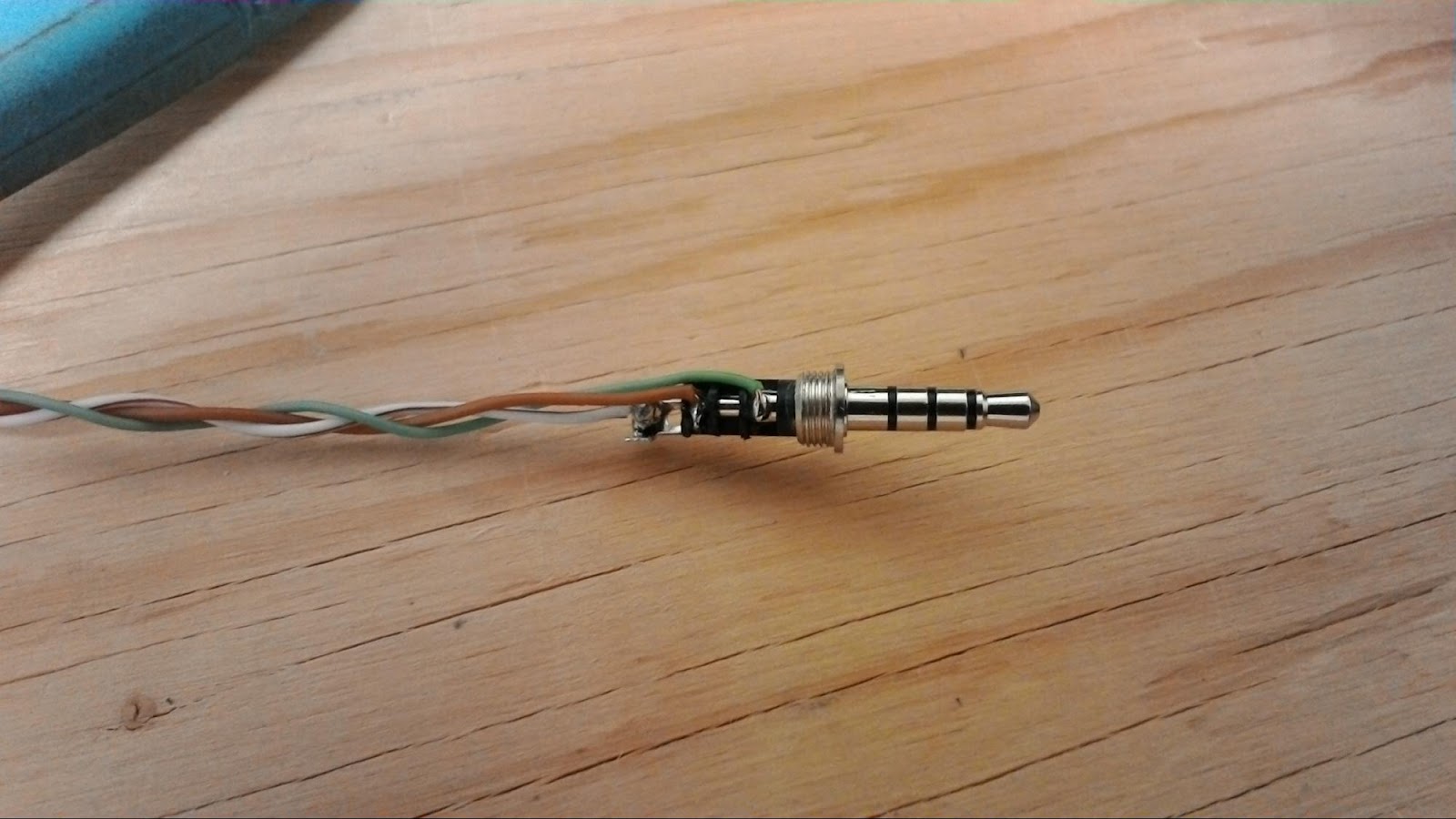
There was a broken connection in the 3.5mm connector that plugs into the Yaesu FT-60 radio and I needed to resolder it.
The brown wire in the picture above sends the received data from the radio to the TNC, and so mine was not able to hear any transmissions.
Yeah, I know that I should use proper wire, not CAT5 solid core, but that's what was on hand to make up the cable.....
Thanks for visiting,
Robin
My didipeater VE6RBN-1 has been offline for sometime and I didn't notice it.....
It was transmitting fine, but not digipeating the packets it received over the air...
Apparently my troubleshooting skills are really, really rusty because I checked out the complete TNC and radio, before looking that the obvious problems like wiring....
There was a broken connection in the 3.5mm connector that plugs into the Yaesu FT-60 radio and I needed to resolder it.
The brown wire in the picture above sends the received data from the radio to the TNC, and so mine was not able to hear any transmissions.
Yeah, I know that I should use proper wire, not CAT5 solid core, but that's what was on hand to make up the cable.....
Thanks for visiting,
Robin
Wednesday, September 16, 2015
Monitoring Vehicle Voltages
Wow!
My last post was in March!
I certainly enjoyed the summer and am looking forward to spending more time back on the bench.
I did stay tinkering during the summer with interconnecting my Raspberry Pi's with Arduino Nano's and Uno's.
The pic below shows my Raspberry Pi connected via USB to my Arduino Uno. I use the analog inputs on the Arduino to monitor the battery voltages in a couple of vehicles that I don't drive every day and to copy that up to a webpage

The small circuit board in the upper right corner is a DC - DC converter and I use it to convert 12VDC down to 5VDC for the Pi and Arduino. It is rated for 5A, so I should have lots of capacity. I've started using Anderson Powerpoles for all of my 12V circuits in my garage and ham shack for interoperability.
Having the power supply on the board also allows me to use a homebrewed POE cable so that I can power and communicate with the Raspberry Pi with one ethernet cable. 4 wires are used for communication and 4 for power (2 + & 2-),

I've also wanted to move away from the Arduino IDE because I usually spend my time ssh'ing into my devices. So I've come across an awesome program arduino-mk which allows you to edit the .ino files with your favorite editor and then use their Makefile to upload it to the arduino. I've successfully used this with the GertDuino, Arduino Nano, and Arduino Uno.
Thanks for visiting;
Robin
My last post was in March!
I certainly enjoyed the summer and am looking forward to spending more time back on the bench.
I did stay tinkering during the summer with interconnecting my Raspberry Pi's with Arduino Nano's and Uno's.
The pic below shows my Raspberry Pi connected via USB to my Arduino Uno. I use the analog inputs on the Arduino to monitor the battery voltages in a couple of vehicles that I don't drive every day and to copy that up to a webpage

The small circuit board in the upper right corner is a DC - DC converter and I use it to convert 12VDC down to 5VDC for the Pi and Arduino. It is rated for 5A, so I should have lots of capacity. I've started using Anderson Powerpoles for all of my 12V circuits in my garage and ham shack for interoperability.
Having the power supply on the board also allows me to use a homebrewed POE cable so that I can power and communicate with the Raspberry Pi with one ethernet cable. 4 wires are used for communication and 4 for power (2 + & 2-),

I've also wanted to move away from the Arduino IDE because I usually spend my time ssh'ing into my devices. So I've come across an awesome program arduino-mk which allows you to edit the .ino files with your favorite editor and then use their Makefile to upload it to the arduino. I've successfully used this with the GertDuino, Arduino Nano, and Arduino Uno.
Thanks for visiting;
Robin
Subscribe to:
Posts (Atom)